Coming Soon: ProSwitcher – Free OpenSource Multitasking iPhone App for Jailbroken iPhones

Old jailbroken iPhone users must be familiar with multitasking applications like Backgrounder, which is a free application with very basic multitasking options.

As with Backgrounder you don’t find too many options, a few weeks ago we came across another iPhone application for jailbroken iPhones called multifl0w that was a successor of Backgrounder and was much more refined. Though the features offered in the application were exciting but the price $5 was bit too expensive considering that it is built on top of Backgrounder which itself is free.

Here we have another iPhone application for jailbroken iPhones users to enjoy multitasking functionality, this application is called ProSwitcher that provides all features same as multifl0w but all that for free. Our first impression about this application is that it is faster and much easier to use than any other multitasking iPhone application around. ProSwitcher is a very light application which uses way less memory than its competitor applications. The best part about the application is that it is kept open-sourced by the developer Ryan Petrich.

ProSwitcher is highly inspired from the multitasking features available on the Palm Pre WebOS, earlier the app was named “PreSwitcher” to avoid potential legal trouble the name was changed to ProSwitcher.

Following is the screenshot of the ProSwitcher in iPhone app:

clip_image001

Currently, ProSwitcher is in beta testing and will be ready for release in a few weeks time by the officials. If you are so eager to test it, the beta version of the jailbreak app is available on Ryan Petrich official website.

Write an email to the author of this post at jawad@techskipper.com
IPHONE Barcode scanner for environment conscious people!

GoodGuideBarcodeReader

With the increasing concerns regarding global warming, there is a need to give consumers enough information about the product before they make a purchase. The more is the product environment friendly, the more will the people like to purchase it. In this way, the companies will be forced to make more greener products which are good to health and the environment.

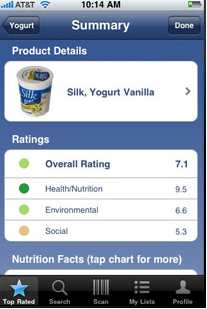
GoodGuide released its barcode application allowing consumers to input the bar code and the application fetched the details about the product but the practice of writing a barcode proved to be a  failure pushing the product to a dark corner of iTunes store. You can imagine, who likes to write down the codes in a busy store? Well, GoodGuide leant a good lesson and came up with an improved application allowing consumers to scan the barcode with the help of iphone and get the product information immediately. The information about the product includes health rating, environment rating and social rating. I think that’s enough information for someone conscious about an environment.

The best of all, barcode scanner is a freeware and can be downloaded from iTunes store.

Download BarCode Scanner from iTunes Store

Write an email to the author of this post at adnan@techskipper.com

Top 4 sites for downloading iPHONE cracked applications

A lot of people are downloading cracked iphone applications but surely I am not a culprit for this stuff. I am of the view that if anyone like some application, he/she should buy it from the store to give full credit to the application developer. With this thing in mind, let’s look at some top sites for downloading iphone cracked stuff.

1. Appulo.us

Appulo.us

It’s the most popular site getting about 18,990 unique visitors per day (results have been fetched from checksitetraffic.com). Most of the files on this website have been placed on appscene.org for download. I mostly access this website but it is down many times, so try your luck! I will emphasize again that if you like any application, please buy it to give credit to the application developer.

UPDATE: Appulo.us has been shutdown, please read the following news.

https://www.techskipper.com/iphone/appulo-us-shutdown-for-good-with-a-note-to-apple/

We will soon update the best alternatives to it, so stay tuned.

2. iphoneapplist.net

iphoneapplist

That’s another big site for cracked applications getting about 1,353 unique visitors per day (results have been fetched from checksitetraffic.com). Here’s an extra thing here, it also tells about how to install .ipa files. I wouldn’t prefer it over appulo.us due to a couple of reasons. First, the uploaded files are password protected which means you will have to extract it every time you download a new file. Many people don’t bother making a little effort in extracting the password protected file but I do. Second, the application description and the snapshots are quite less as compared to appulo.us.

3. igui.ru

igui.ru

That’s a Russian site but who cares as long as you can find a bunch of applications which you are unable to find on other sites.

4. vnmstore.net

vnmstore

It was a difficult choice to put this site to number 4 as it provides a quick interface with considerable number of applications. Its interface is similar to Appulo.us.

Note: TechSkipper.com takes no responsibility for the promotion of sites providing cracked stuff. We emphasize everyone to buy the application from the store if they like it. The information provided above is for fun only.

Write an email to the author of this post at adnan@techskipper.com

Google Phone: Better than Apple’s iPhone? – Launching Next Month

Few days back there was a post by Google in which it was mentioned that they were doling out a new mobile device which will run on Android 2.1 to their employees to test the new device and help improve it before launching the product.

clip_image001[4]

This is indeed the much talked about new Google Phone by Google, following is the information that we know about it till now:

Continue reading »

Backdoor trojan for credit card and other online thefts spreading at a fast rate

A recent SQL injection attack has compromised about 170,000 websites. This result was found by searching the trojan on Google. Four days back, the results were found to be 125,000 and as of today the search gave 170,000 results. Amazingly enough, Yahoo and bing searches yielded 287,000 and 146,000 results respectively.

Mary Landesman has given the following explanation on SafeScan blog:

When users visit a compromised Web page, the injected iframe executes a script that creates a new iframe to 318x.com/a.htm. That iframe (a.htm) does 2 things:

  • Loads a second iframe from aa1100.2288.org/htmlasp/dasp/alt.html;
  • Loads a script: js.tongji.linezing.com/1358779/tongji.js (used for tracking).

The aa1100.2288.org/htmlasp/dasp/alt.html iframe then:

  • Creates a third iframe pointing to aa1100.2288.org/htmlasp/dasp/share.html;
  • Loads a script: js.tongji.linezing.com/1364067/tongji.js (similar to above, but different tracking number);
  • If <noscript> it has an href tag that points to www.linezing.com with an img src of img.tongji.linezing.com/1364067/tongji.gif.

All fairly common techniques. But once it gets to share.html, things get interesting. As its name implies, share.html is acting as a master file to include other components of the attack. Over a dozen other script files are called through a convoluted chain of iframes and src references largely dependent on the browser type, version of Flash, and related criteria.

If the above exploitation is successful, Backdoor.Win32.Buzus.croo malware is copied to the target PC which can be used to remotely control the program and use it for credit card or banking thefts.

From Virus Total, 22 out of 40 antivirus have been able to detect the Trojan successfully.

Check if your antivirus can save you from the attack!

Write an email to the author of this post at adnan@techskipper.com

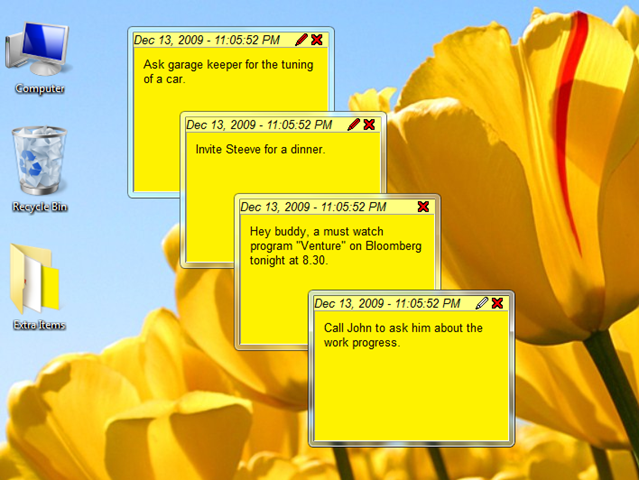
Sticky notes from all over !

StickyNotes

In today’s world, distractions have been increased and due to that one forgets many tasks easily. With sticky notes, there is a little or no chance that you miss anything. For the same reason, they are popular since 1980’s. However, as every other thing, the notes have also become electronic. There are many software available on internet that add notes to your desktop, I personally use “Sticker Lite”.

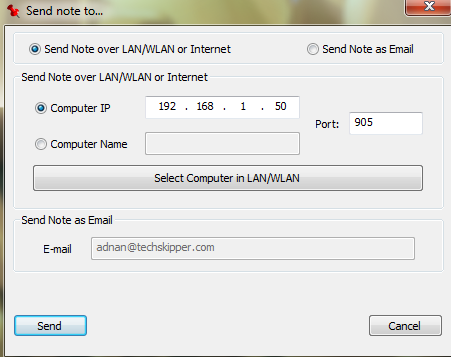
One cool feature of Sticker Lite is its ability to send notes to other desktops. You have an option to specify opposite PCs IP Address or Computer Name or you can search the LAN for other hosts. You can also send the note by email.

SendNote

Notes are extremely easy to create with Sticker Lite, you can import/export the notes as well. Other than that notes can be created in different languages and can be printed if required.

Download Sticker Lite

Write an email to the author of this post at adnan@techskipper.com

Download Blacksn0w to Unlock iPhone 3G 3GS 3.1.2 Baseband 5.11.07

Thanks to GeoHot, who finally ends the Dilemma of baseband 05.11.07 after releasing blacksn0w a soft that unlocks for iPhone 3G, 3GS running on 5.11.07 baseband, Blacksn0w can be downloaded from Cydia or directly from Blackra1n website. If you haven’t jailbreaked yet means you don’t have Cydia on your iPhone screen then follow our Blackra1n jailbreak + Sn0w Unlock guide here Jailbreak Unlock iPhone 3G 3GS 3.1.2 with Blackra1n And if you only need an unlock and you also have Cydia installed on your iPhone then follow the following steps.

Step One: Tap Cydia icon to launch Cydia.

clip_image001

Step Two: Tap Manage

clip_image002

Step Three: Tap Sources

clip_image003

Step Four: Tap on Edit

clip_image004

Step Five: Tap on Add.

clip_image005

Step Six: Here under Enter Cydia/APT URL write blackra1n.com and wait for Cydia to install the repo.

clip_image006

Step Seven: Now go into the blackra1n repo or in Cydia search for blacksn0w and then click on install blacksn0w.

Step Eight: Once completed, open the ‘blackra1n’ app on your iPhone’s home screen and install ’sn0w’.

clip_image007

Step Eight: You are done, enjoy your unlocked iPhone 3G/3GS.

Write an email to the author of this post at jawad@techskipper.com

Jailbreak Unlock iPhone 3G 3GS 3.1.2 with Blackra1n

The good news is out and now you can jailbreak unlock your iPhone 3G, iPhone 3GS with baseband unlock 05.11.07 using GeoHot’s Blackra1n RC3 software, which is available for both Windows and Mac (Tiger+PPC) users. Blackra1n RC3 is one click simple way to jailbreak your iPhone, the most advanced and easy to use utility. Blackra1n RC3 comes with Blacksn0w that is used to unlock latest 05.11.07 baseband and also improves huge 15 second speed.

Download of interest

Prepare your iPhone to Jailbreak

Before attempting the tutorial consider all the following points and select right method for you:

  1. If your iPhone 3G/3GS is locked with firmware 3.X.X not jailbreaked before: Please follow the Step One to Step Six.
  2. If your iPhone 3G/3GS is locked with Firmware 3.X.X and jailbreaked before : You have two conditions

· Check your iPhone springboard for Blackra1n.app application as can be seen in the following image. If it is there simply tap to run the application. Here you’ll find “ra1n” in place of Icy. Tap this to install and upgrade your application. After you are done with upgrading, run blackra1n.app once again, install “sn0w" and enjoy your unlocked iPhone 3G/3GS.

clip_image001[4]

· If by any means you’ve deleted the Blackra1n.app from your iPhone or you are on pwned iPhone then you are left with simply two options, wait for the Blacksn0w release on Cydia, or follow the following condition and do a clean install of 3.1.2.

Step by Step Guide to Jailbreak your iPhone

Step One. Download Blackra1n RC3 from the link provided above and launch the program.

clip_image002[4]

For Windows 7 and Vista users if you face any issue while launching the Blackra1n RC3 software on your PC follow below mentioned instructions.

  • Right-click on the blackra1n icon (not the shortcut) and go to properties.
  • Select Compatibility tab, under compatibility mode check the box to enable the option and select Windows XP (Service Pack 2). Click OK, and then launch blackra1n.

Step Two. Connect your iPhone to your PC using cable and then click the make it ra1n button.

clip_image003[4]

Step Three. Blackra1n will start its process in the background to jailbreak you device. For the purpose first your device will automatically be placed in recovery mode. Then you will see a picture of GeoHot that replaces the regular recovery mode screen on your device.

Step Four. Your iPhone or iPod Touch will automatically reboot itself once blackra1n is done. After reboot you should see the blackra1n icon on you springboard. If you don’t see it on the first page, go to the last page on your iDevice and you should see blackra1n icon there.

clip_image004[4]

Step Five. Tap on blackra1n icon from your springboard and there you’ll have the option to install Cydia, Rock and Sn0w. My recommendation is that you do not install them all at once, because that may cause problems. Install them one at a time then reboot and then second one starting with Sn0w.

clip_image005[4]

Step Six. After installing Sn0w you’ll get your device unlocked. Just hit the sn0w button and the magic will happen itself. Here you go, enjoy any operator’s SIM card on your unlocked iPhone 3G/3GS with baseband 5.11.07

Write an email to the author of this post at jawad@techskipper.com
Until Christmas comes to your door — Count Down!

ChristmasSleeps

As Christmas comes closer, the activities including shopping and other stuff comes to full swing. This year, it’s not much different and this is a peak time for all the activities. Why not? as two events are coming together as always — Christmas and a new year.

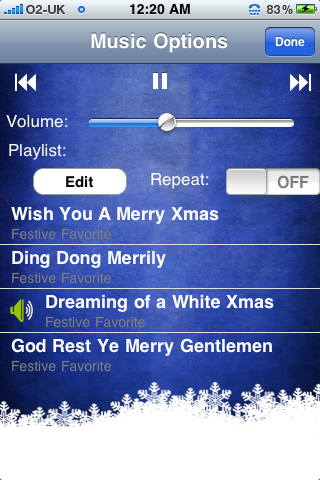
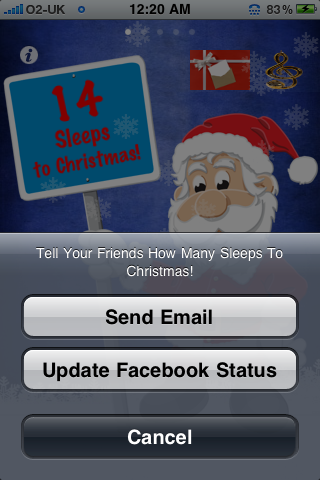
Most people speed things up when it comes closer enough but to make sure everything is done in time, everyone must count down! and ALPHONETIC has done its part by releasing a small iphone application displaying the number of sleeps remaining till the Christmas. As the application runs, the background music starts, which can be chosen by tapping the Santa. One cool feature of the application is that you can share your status on Facebook or send the status via email.

ChooseMusic    Share

Write an email to the author of this post at adnan@techskipper.com

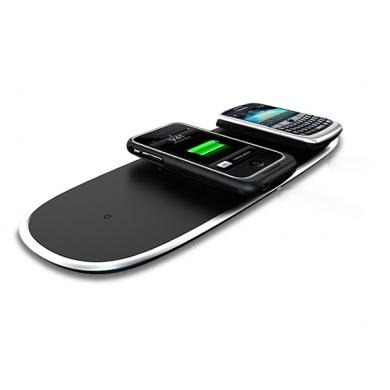
Charge your electronics devices wirelessly through pOWERMAT

PowerMatCharging

Image: POWERMAT charging iphone wirelessly

It’s true that technology is advancing at an extremely fast pace but there are some areas where the advancement is somewhat sluggish. Energy charging devices for home use is one of those areas. However, after reading this article, you will surely feel that things have started to move on in this area as well and the idea is to go wireless while charging. POWERMAT is not  a perfect wireless device which you might be expecting but still it is wireless in the sense that you are not required to plug wire to your device like iphone. However, the mat uses a cord.

With POWERMAT you will have to get a case for your device which allows phone to charge without any cord or you have an option to buy a holder which will be placed on a mat and when you put the device to the holder, it will start charging. Checkout the following video demonstration for POWERMAT:

Find More Details About POWERMAT

Write an email to the author of this post at adnan@techskipper.com