easiest way to Change your DNS to google DNS Servers

At the start of this month, Google announced its free DNS service. You can read about the announcement here. At that time, I included the method to change your DNS address to Google but what if you have some wireless connection like WiMAX or CDMA EvDO and want to change the DNS address? The difficulty in some of these ISPs is that they issue a new public address to your PC every time you reset your internet connection and with that the DNS address also gets reset to ISP default. Even if some techs change the DNS but the majority still don’t have skills for this. So, “Google DNS Helper” comes to rescue.

“Google DNS Helper” is a simple tool which allows you to change your DNS address to Google and restore your original address whenever you wish.
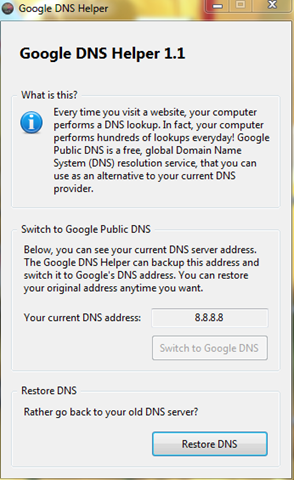
Google_DNS_Helper1.1

image: Google DNS Helper v 1.1

Just two buttons on the tool, one to switch to Google DNS Server and other is to restore your original DNS. Easy! right?

Download Google DNS Helper v1.1 

Write an email to the author of this post at adnan@techskipper.com
How to install cracked applications on IPHONE

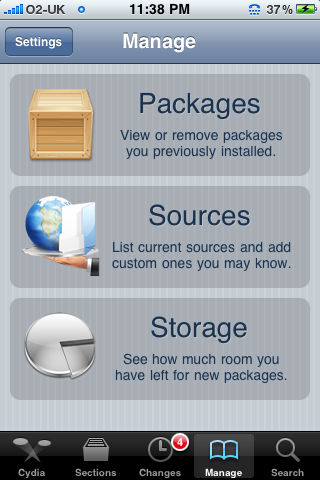
Cydia

image: Cydia main window.

To install the cracked applications, you must have a jail broken phone. If you want to check out the process of jail breaking, check here. The step by step process for installing a cracked application is as follows:

Step 1: Run Cydia and tap on the “Manage” tab as shown in the above snapshot.

Step 2: Choose “Edit” and then “Add”.

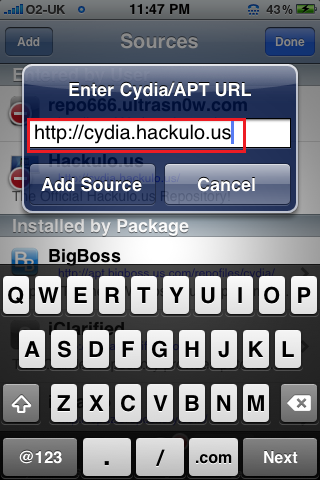
Step 3: Enter the following URL in the box.

URL : http://cydia.hackulo.us/

Add_Package

After entering the URL, tap “Add Source”. Cydia will download the packages from an internet.

Step 4: After that, come to the main window of Cydia and tap “search” tab.

Step 5: Search for “AppSync” and install it.

Step 6: Restart your iphone.

Step 7: Download cracked applications from the concerned sites. If you want help downloading cracked applications, click here.

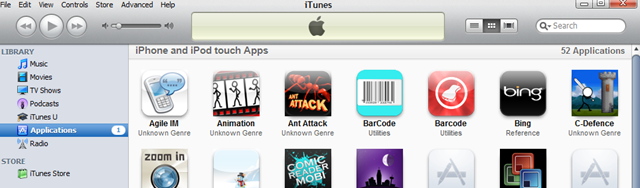
Step 8: After downloading .ipa files, run iTunes. Drag the downloaded application to the “Application” section of the iTunes software.

iTunes_Applications

Step 9: Choose your iphone device on iTunes software and click “Sync” to install the application to your iphone.

Step 10: Run the application on iphone and enjoy !

Note: TechSkipper doesn’t encourage cracked applications. If you like any application, please purchase it from iTunes store to give full credit to the developer. The above information has been provided for educational and fun purposes only.

Write an email to the author of this post at adnan@techskipper.com
What is the difference between Jailbreaking & Unlocking

The largest selling GSM phone iPhone is locked to its authorized operator’s SIM card only. To use iPhone with anyother network requires jailbreaking as well as unlocking. The difference between unlocking and jailbreaking is very simple and easy to understand. Jailbreaking makes you able to use your device functions (change wallpapers, add ringtone, or even run third-party app), but to enable your iPhone to run any GSM carrier worldwide you need Unlocking. Jailbreaking is a process by which you can open your iPhone’s file system so that it can be accessed easily from your PC or MAC.

iphone unlocked jailbreak

Continue reading »

Easiest way to search for serials and cracks

I am not fond of using cracked software but sometimes I find cracks for fun purposes but the process is too annoying since the search on google or bing show many results but they are of no use. Mainly, you can say that “Google is your friend” but it doesn’t help you find cracks. As you can see, search engines have left us on this point. So, the second way is to access sites directly which contain a cracks database. But here, you will definitely find a lot of porn stuff and if you are in office and trying to find some crack online, it will be too embarrassing for you if you get caught. Ahh, so where to go now. The answer is Craagle. Don’t open your dictionary to look up this word! it is a software name.

Craagle allows you search for cracks from 14 different sites with a little effort. The effort involves writing a software name whose crack is required in the search box and click “search button” and that’s all. Craagle will automatically fetch the results from different sites. If you want to have a serial, just choose “serials” under “What”.

Craagle

image: Cracks and serials search with Craagle.

Surely, your life will be much easier with Craagle. The download link has been provided below after the Note.

Note: The above information has been provided for educational and fun purposes only. TechSkipper doesn’t encourage cracked software. If you like any software, please purchase it to give full credit to the developer. TechSkipper holds no responsibility for the download of any software helping in finding serials and cracks.

Download Craagle 1.91

Write an email to the author of this post at adnan@techskipper.com
Western Digital Launched1TB Portable 2.5 inch Hard Drive

Here is good news for people, who are worried about how to store their large amount of data, and in carrying heavy devices with them. The Western Digital (WorldWide leader in storage) has launched One Terabyte (1TB) and 750 Gigabyte (GB) models in My Passport Essential SE Portable USB Drives. This compact drive fits easily in your pocket or purse, weighs only a few ounces and with massive storage capacity, now you can take tons of photos, videos, files and music with you wherever you go. This device is currently available from Western Digital’s online store and at some selected retail stores in US. My Passport Essential SE 1 TB portable drive is available for $299.99 USD and for the 750 GB model is for $199.99 USD.  It is a much secured device and no other separate power supply is needed. Portable drives powered directly from the USB port on your PC. . Both portable drives come with Government-grade security for the drive and the data on it with 256-bit hardware-based encryption and password protection.

Continue reading »

Finally bing lands on an iPHONE

bing

Microsoft has released a Bing search application for IPHONE. Well, that’s not the first Bing application for the mobile phone. Previously, Microsoft launched Bing for Windows Mobile, BlackBerry and Sidekick. Now the application version for IPHONE is available on iTunes.

Justin Jed of Bing has the following views for the Bing application:

Let’s talk about some cool stuff you can do with the Bing App. Our investments in voice search (you may have played with them on Windows phones or BlackBerry already) continues in our iPhone App and works great for map locations as well as old fashioned web search. Just say “San Francisco weather,” for a quick result, or even say a full address for a map or directions. Try something complex, like “1 Microsoft Way, Redmond 98052.” (Yes, I know how to get to work.) Hold the phone to your ear and speak, or press the mic button—simple. 

Speaking of directions (ha), looking for a coffee shop nearby? Bing automatically finds your location. It’s also easy to discover a new spot by category such as restaurants, banks, theaters and choose whether you want walking or driving directions.

The cool feature of Bing is its endless scrolling for images. The address search on Bing Maps is also efficient ,supported by voice.

Download Bing from iTunes

Write an email to the author of this post at adnan@techskipper.com

How to remove a folder showing an error “Cannot delete folder: It is being used by another person or program”

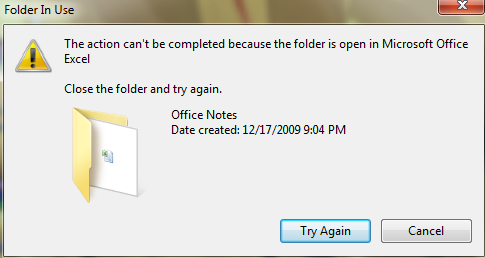
You surely have met errors while renaming, deleing or moving some file or a folder. When you do some of these operations on a file/folder which is currently open or is in use by some other application, you get any of the following messages:

1) The file is in use by another program or user.

2) Cannot delete file: Access is denied

3) The source or a destination file may in use.

4) Make sure the disk is not full or write-protected and that the file is not currently in use.

5) There has been a sharing violation.

Sometimes, the situation becomes too annoying when even closing everything, the error don’t just go away. To resolve the issue, I used to restart my computer 🙂 but that was a time when I didn’t know about “Unlocker” which can do the right thing for you by telling you the exact program which is causing an issue. That’s not the end, with Unlocker you can do various operations on the program as well such as closing the program or just unbind the program from the folder on which you want to perform some operation.

But Microsoft realized this stuff is too annoying for people. So, the improvement came with Windows 7 which tells us the program which is a hurdle for current operation. However, you still have to go and close the application by finding it manually. So, Unlocker still saves the day!

Error_Message_Windows7

Image: Windows 7 Notification !

Unlocker is a freeware and can be downloaded as follows:

Download Unlocker 1.8.8

Write an email to the author of this post at adnan@techskipper.com

iClassic Turns Your iPhone (jailbroken) in to iPod Classic

For all the music lovers who own iPhone or iPod touch, here’s good news for you. Now with iClassic app you can convert your device into a Classic iPod and listen to your all time favorite songs. The app can browse the entire music library just like the good old iPods. iClassic the iPod Classic emulator for both iPhone and iPod touch that is now available in the market at a very reasonable and affordable price (2$ Only) and it’s worth it.

The app does not offer the original black or silver iPod classic look as that’s the Apple proprietary design, but iPod Classic themes for iClassic can be easily downloadable from Cydia and enable it via Winterboard.

Some screen shots of iClassic:

3. iPod Classic 1. iPod Classic 2. iPod Classic

Features of iClassic

  • Beautiful iPod classic-like interface.
  • Fully functional, math-based click wheel (touch detection is math-based, therefore acting just like you’d expect it to).
  • Tap “Menu” and browse your entire music library.
  • Control your music completely with the click wheel.
  • All buttons are completely functional.
  • Shake to shuffle your current playing list.
  • Hold next and previous to seek forward/backward.
  • Choose between two colors, black and white.
  • Choose if you want the status bar to appear shiny or to be matte.
  • Choose if you want the app to vibrate when you press a button (iPhone only).

Write an email to the author of this post at jawad@techskipper.com

Google to provide URL shortening service, Goo.Gl

google-logo


Google seems to be quite busy these days as there are a lot of announcements especially during last three weeks. Recently, they have announced the URL shortening service for Google Toolbar and Feedburner but if this idea works, Google will make the service available for a larger audience according to the announcement.

The shortening service is suitable for sites such as a twitter as the number of words in one post are limited and if the URL is too long, the links cannot be posted . The shortening service comes with new benefits as told by Google on their official blog:

Second, we’ve built this on Google’s global infrastructure to offer the following benefits:

  • Stability: Google’s scalable, multi-datacenter infrastructure provides great uptime and a reliable service to our users.
  • Security: As we do with web search, shortened URLs are automatically checked to detect sites that may be malicious and warn users when the short URL resolves to such sites.
  • Speed: At Google we like fast products and we’ve worked hard to ensure this service is quick. We’ll continue to iterate and improve the speed of Google Url Shortener.

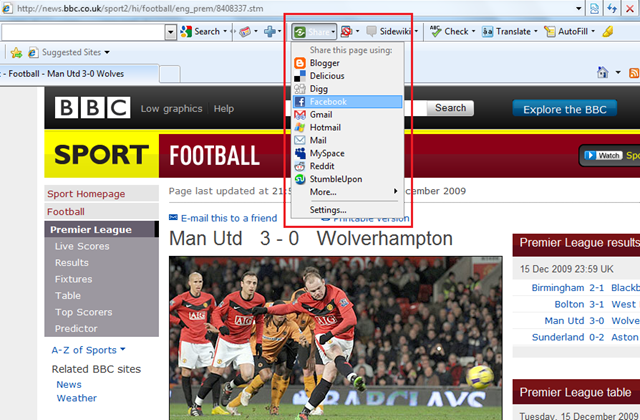
It is expected that service will be widely used in the toolbar as it will make it easy for everyone to share the website pages ,on social networks, with short URL.

Google-Toolbar

Write an email to the author of this post at adnan@techskipper.com
New Version of Google Mobile iPhone App Now Available On App Store

Google has launched a new version of Google Mobile iPhone app which is now available on the Apple App Store, in this app the main focus is on providing the users’ faster and easier access to the information they need. This app has made a significant improvement in the providing the results.

Earlier, iPhone users complained of problems they faced in iPhone app, that search results opened in Safari rather than from within iPhone App. This new version of Google Mobile iPhone App has solved the problem by making search results open from inside the app itself

Following are screen shorts for the application:

1. Google iPhone Application 2. Google iPhone Application 3. Google iPhone Application

There have been some tremendous improvements regarding the customization of the iPhone app. Like, in order to convey results (your voice) to voice-based search more precisely, iPhone app has now enabled you to select your own preferred accent. No matter in which country you are, you can select your own language accent and the app will be able to recognize your requests better.

In Google Mobile iPhone app now all the features are made more prominent for the users to customize the app according to their choice of favorite colors and shades. This app is available and can be downloaded for free.

Write an email to the author of this post at jawad@techskipper.com