Apple Tablet to provide Tactile feedback?


Apple_Tablet

image: Upcoming Apple Tablet – Rumors

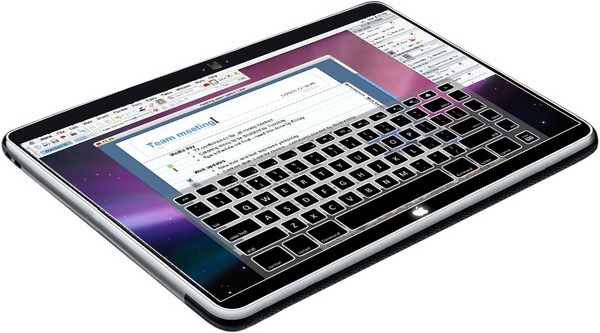
A lot is being heard about the upcoming Apple Tablet. With rumors spreading and everyone guessing what might the device deliver, Apple shares got a spike. Well, with all that, there are some more interesting news for Apple lovers and those planning to buy the tablet as it comes to the market. Apple upcoming tablet might have a tactile interface while one taps on the screen keyboard.

So, You will feel the dynamic surface of the tablet and that’s better than the keyboards offered yet, whether they are on iphone or a pocket keyboard (We wrote about the Laser keyboard that can fit in to your pocket, you might want to have a look). The tablet could be relying on Articulating Frame, so the surface of the tablet would generate bump or a dot for the user to feel. Interesting! huh? The AppleInsider says:

Using an "articulating frame," the surface of such a device would create physical bumps or dots for the user to feel when it is in keyboard mode. Those surface features would retract and disappear when the device is not being used to type. It is detailed in an application entitled "Keystroke Tactility Arrangement on a Smooth Touch Surface." It is similar to an application first filed back in 2007.

"The articulating frame may provide key edge ridges that define the boundaries of the key regions or may provide tactile feedback mechanisms within the key regions," the application reads. "The articulating frame may also be configured to cause concave depressions similar to mechanical key caps in the surface."

With all that said, I am sure you will be seriously repenting if the screen breaks somehow. Of course, because you’ll have to spend a lot while repairing it. I hope you’ll be caring a lot 🙂

Follow us on Twitter @TechSkipper

The author of this post can be contacted at adnan@techskipper.com

Flickery 1.7, better than ever?

Flickery1.7

Flickery is a Mac-based client for Flickr, a great resource for photos, which can search,browse, upload and download photos from Flickr. Other than that, you can share photos on twitter,email and even on your blog with Flickery. It is a great time saver and has an outstanding interface.

Last October, Flickery 1.6 was released with an addition of new features like the batch editing of photos, Core Location integration and video trimming.  They were of course great features but the new version i-e 1.7 is no doubt a holiday gift for people loving Flikr. New features added to this release are preferences panel, auto-resizing , set the photo as a desktop background,drag n drop integration with Finder and much more. Although, Flickery 1.6 is very stable yet there has been some fixes in 1.7 removing potential crashes and bugs.

Good news is that Flickery is on sale till the 1st of January. Purchasing it now will save you 25% of the cost. So, if you are interested, you better hurry up!

Get Flickery 1.7

Follow us on Twitter @TechSkipper

Write an email to the author of this post at adnan@techskipper.com

Get rid of old fashioned vacuum Cleaners; Get escargot

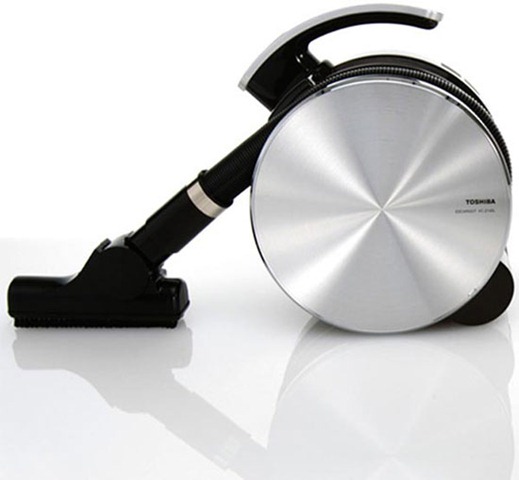
You think your vacuum cleaner looks like a spaceship which is quite heavy and doesn’t have a good look to fit in your home environment? Then, it’s right time for you to replace your cleaner with Toshiba Escargot. As the name suggests, the cleaner has a snail like appearance. Check it in the following snap:

Toshiba_Escargot_Vacuum_Cleaner

image: Toshiba Escargot Vacuum Cleaner

Escargot Cleaner is a product of combined efforts from Toshiba and Electrolux. The weight of this device is only 2.1Kg but don’t underestimate it with the size and weight, this device has cyclone vacuum inside with high suction rate, so it is going to perform better than the traditional vacuum cleaners. It has a shoulder strap through which it can be rolled around with comfort.

Apart from comfort, we hope its sexy look will appeal most of the people and you will not be ashamed doing your housework with it, rather you will do the work with style. That’s a perfect way to go in this modern world. Right?

Follow us on Twitter @TechSkipper

Write an email to the author of this post at adnan@techskipper.com

Traces of iPhone Firmware 3.1.3 and OS 4.0 Found

In today’s world it is impossible to stop at any one point and not proceed further. This is true for our friends at Apple as well. Traces of firmware 3.1.3 and OS 4.0 were found by BGR in their visitors’ log. This is a clear indication that Apple is testing and updating for the upcoming iPhones. Cupertino Campus is the hot spot right now as updates are definitely in the process of making even though no beat version has been released for developers. This news raises alarms for people falling in two categories, one, those who use jail broken iPhone 3G and secondly those who want to update their jail broken iPhones. People falling in first category should instill in their mind that they should save their Cydia SHSH as soon as possible if they have not as yet. Doing so will enable you to use your jail broken iPhone even if Apples stops signing 3.1.2 firmware. The people in second category should not update their jail broken iPhone directly to firmware.

iPhone-Firmware-3.1.3-4.0

Continue reading »

How to Make Custom iPhone Ringtones for Free !

It’s always useful to familiar yourself with the tips and tricks which can save you money and you are here for the same purpose. right? The purpose to learn how to make the ring tones yourself instead of making a purchase. The process is quite simple and I would like to guide you step by step, so bear with me.

Step 1: Open up iTunes.

Step 2: Choose the song whose little portion you want to set as a ring tone. For example, I would like to cut a small portion of the song “Piece of Me” from Britney Spears.

Step 3: Play the song and note the start and stop times of the portion of the song which you want to take as a ring tone. In my case, I would like to make a ring tone from start point of 1:00 and end time of 1:40 i-e 40 seconds long ring tone.

Continue reading »

Create a perfect art with Sketches 2

Sketches2

Sketches is one of the applications which was available on iTunes store at the very first day of its opening. At that time, the price of this application was $7.99 but since then there was a storm of applications entering the iTunes store and apparently price of applications dropped as the quantity increased. The fate of Sketches was not much different and today you can buy it on iTunes for just $0.99.

However, LateNiteSoft has come back with a lot of improvements in Sketches and the new version is being called “Sketches 2”. The developers will take one buck more for the improvements which means you will be able to get the new version from iTunes Store for $1.99. Sketches 2 is something which we didn’t get from Sketches. In other words, broken links have been fixed in the new version. Here is what they fixed, Sketches 2 has come up with a lot of improvements in the user interface and now you can work on the chosen image without being annoyed by the tools hanging all over your picture. Other that that, there has been an addition of the tools like brush and a zoom feature.

Continue reading »

Frings iPhone App making Video Calls possible on iPhone

Conbination of iPhones and video calls seemed impossible but now it is reality. Thanks to an Israel based mobile VoIP service provider called Fring that has not only made it possible for iPhone but also for Nokia smartphone and iPod Touch users. These calls are made using WiFi service.

iPhone Fring

Continue reading »

iPhone 2G / iPhone 3G can now Record Videos using iPhone Application, iVideo Camera

Application developers are doing a good job in making the Apple’s Application Store attractive day after day. It took some time to make certain things possible on iPhone, that too on the older version iPhone 2G. Now Video recording is also possible after successful live video streaming and live video broadcasting applications.

iVideo Camera 1 iVideo Camera 2

iVideo Camera revolutionized iPhone by bringing to it the option to record short videos at 3 FPS on iPhone 2G and iPhone 3G. It also has the ability to capture and save pictures and further share it on internet through socializing websited, such as facebook, Twitter and YouTube.

Continue reading »

The Virtual Laser Keyboard

Tell me what it is??

This is exactly what you would want to take out of your inner coat pocket and use during a presentation, or want it as a business gift. The device is wrapped in an elegant leather jacket and compatible with almost all smatphones, Blackberry, PDA, MAC, Nokia (Symbian series) and Tablet PC’s. VKB (Virtual Laser Keyboard) is a ground breaking accessory. It is light and merely a size of a zipo lighter. It generates a full size fully operating laser keyboard.

VIRTUAL KEYBOARD

VKB’s operations are exactly like those of a conventional keyboard. The user has to tap the projected imaged keys, based on optical recognition mechanism (directional technology). An extra affect added to it is the real tapping sound it makes when the keys are tapped.

Continue reading »

Smart CCTV that can identify between a suicide bomber and a cleaner called SAMURAI – An Intelligent CCTV

The only question in every body’s mind nowadays is of security. More and more work is done to stop the increasing disorder in the society. The only question is how would you differentiate between a delivery man and a prospect suicide bomber? It seams to be a riddle of some sort but scientist and the greatest minds are working on intelligent video surveillance software.

Shaogang Gong a computer-vision computation researcher at Queen Mary, University of London says “The current CCTV can collect masses of data but a little of it is used. What we need are better ways to mind that data”

Smart_cctv

Continue reading »