Make your Web surfing faster and reliable with Google DNS Servers

Slow address resolution is one of the major reasons for slower browsing. The address resolution is done by the DNS server. In simpler words, DNS Server converts the human readable web addresses (Like www.techskipper.com) to computer readable addresses (also know as IP address). When we write website address to internet explorer and press “Go”, the address is forwarded to DNS Server which translates this address to an IP address. If DNS Server takes time to resolve the address, our browsing is obviously slowed down.

Recently, Google has launched its public DNS servers to provide faster, secure and reliable web surfing to the end users. Google in its own words:

We are offering the service to the public in the hope of achieving the following aims:

  • Provide end users with an alternative to their current DNS service. Google Public DNS takes some new approaches that we believe offer more valid results, increased security, and, in most cases, better performance.
  • Help reduce the load on ISPs’ DNS servers. By taking advantage of our global data-center and caching infrastructure, we can directly serve large numbers of user requests without having to query other DNS resolvers.
  • Help make the web faster and more secure. We are launching this experimental service to test some new ways to approach DNS-related challenges. We hope to share what we learn with developers of DNS resolvers and the broader web community and get their feedback.

Now you have three options: 1) Use Open DNS 2) Use ISP DNS 3) Use Google DNS. Most people stick to the DNS provided by their ISP but the web experience might not be that good. But here is a catch, the closer the DNS server is to the user, lesser is the time for request to reach the DNS server. One can say: my ISP DNS is closer to me than Google DNS. Well, Google is smarter and has addressed this by locating its servers worldwide as it says:

For closed resolvers, this is not really an issue. For open resolvers, the closer your servers are located to your users, the less latency they will see at the client end. In addition, having sufficient geographical coverage can indirectly improve end-to-end latency, as nameservers typically return results optimized for the DNS resolver’s location. That is, if a content provider hosts mirrored sites around the world, that provider’s nameservers will return the IP address in closest proximity to the DNS resolver.

Google Public DNS is hosted in data centers worldwide, and uses anycast routing to send users to the geographically closest data center.

Note, however, that because nameservers geolocate according to the resolver’s IP address rather than the user’s, Google Public DNS has the same limitations as other open DNS services: that is, the server to which a user is referred might be farther away than one to which a local DNS provider would have referred. This could cause a slower browsing experience for certain sites.

Now here is a procedure to change your DNS server to Google:

Step 1: Go to Control Panel>>Network and Sharing Center>>Change Adapter Settings.

Step 2: Right Click the connection to your ISP and select Networking tab.
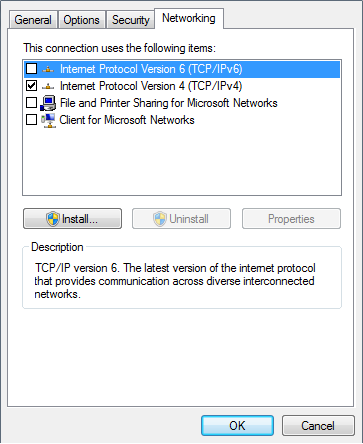
Networking

Step 3: Choose “Internet Protocol Version 4 (TCP/IPv4)” and click properties.
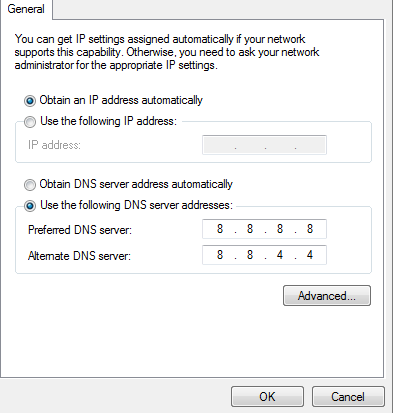
Setting DNS

Select “Use the following DNS server addresses” and write 8.8.8.8 in preferred DNS server and 8.8.4.4 in Alternative DNS server. Click OK. You may require to reset the connection to apply the changes.

Check the following video tutorials for setting Google DNS servers for XP,Vista and Windows 7.

Tutorial # 1: How to setup Google DNS on Windows XP

Tutorial # 2: How to setup Google DNS on Windows Vista/Windows 7

Enjoy your browsing !

( Write an email to the author of this post at adnan@techskipper.com )

Download YouTube videos on IPHONE

You can use MxTube software ,developed by MxWeas, to download youtube videos on iphone. The function of direct playing of the video is also available but I personally use a separate youtube application for using youtube (if I am not in a downloading mood) because MxTube can give you the video results based on search only. Otherwise, it doesn’t show the top videos of YouTube.

By the way, this is one of the applications which Apple don’t want on your iphone. I think you have guessed by now, it works only on jail broken phones. Just one more thing before we discuss the steps to download the video. The version 1.5c have a feature of TV out, so you can play your youtube videos on TV. Here is what the developer says about the new option on MxWeas website.

All users on firmware 2.x can now download MxTube 1.5c! This minor revision updates MxTube to support TV Out. I’ve made the transition into the movie player a little smoother as well. Thanks to BigBoss (thebigboss.org) this update is now available in Cydia. I’ve decided to write MxTube 2.0 from the ground up and fix the numerous downloader mistakes I made in 1.5. I’m going to take a look at the new YouTube application in 3.0 to see how they handle user accounts. If possible, it will be a feature in MxTube 2.0.

Max

Lets come to the procedure, it’s quite simple.

Step 1: Open up the application. On the start page, there will be four tabs at the bottom as shown below:

image

Choose search tab.

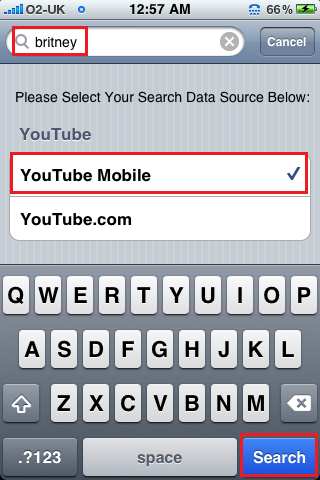
Step 2: Write the search word, select “YouTube Mobile” and then tap “search”

Search

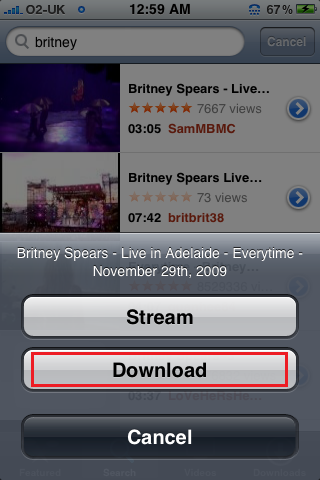
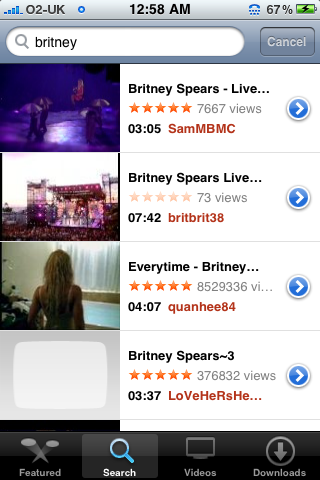
Choose the video you want to download out of the search result.

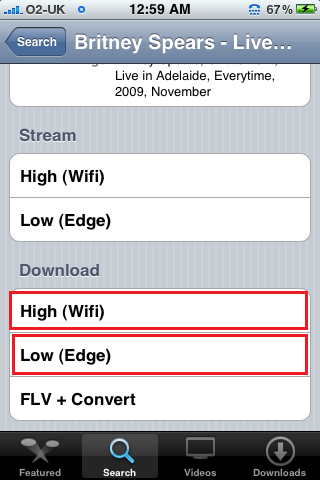
Britney_Search  Download_Video  Download_Quality

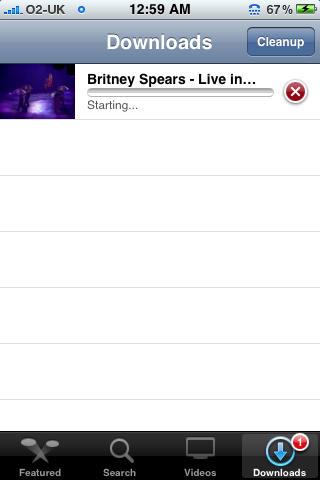
Step 3: The “Downloads” tab will show the progress bar like in iTunes. After the download is completed, go to “Videos” tab to play the video.

Downloading_BAR

Currently “FLV+Convert” option isn’t working as it says “Feature unavailable”. Let’s see if this can be fixed in later versions!

( Write an email to the author of this post at adnan@techskipper.com )
How to disable application notifications on IPHONE

Well most applications give user a choice to turn the notifications ON/OFF in the first access but on some, the notifications are ON by default which is somewhat annoying for many. Yes, not everybody want to get alerts. So, if you are one of them, the following procedure will guide you to get rid of these notifications.

Step 1: Go to Settings as shown by the following icon on your iphone:

Settings_icon

Step 2: Go to “Notifications” as shown by the red rectangle.

Notifications

Step 3: Choose the application for which you want to disable the push notifications. Here I will disable the notifications by the application “Christmas Count Down” which sends push messages regarding  remaining time until Christmas day.

image .

Step 4: Turn the notifications off by tapping the blank half of the rectangle showing “ON” at the moment.

Christmas_Notifications

It’s done! The application won’t annoy you any more.

(Write an email to the author of this post at adnan@techskipper.com )
How to Activate Video Camera in iPhone 2G/3G OS 3.0

Before I start I must inform you that the post is to activate (swap you native iPhone still camera to record just videos) video camera so please bear in mind we are not talking about recording with your iphone 3G 2G on OS 3.0. 2G and 3G users will also be able to do that as we are currently working on it. This post is a preview of native video recording application included in iPhone 3G S.  We’ll publish the every latest news so stick with us on techskipper.com. For you reference to activate the camera you need a jailbroken iPhone 3G S running OS 3.0 and SSH client (WinScp for Windows and Cyberduck for Mac). Warning please do this only if you are aware of SSH, WinScp, iPhone File system etc.

1

Download These Files :

  1. M68AP.plist
  2. Any .mov video file (for test run on you iPhone)

Procedure to Activate Video Camera in iPhone 2G/3G OS 3.0 :

  1. Download the M68AP.plist file as provided to your PC and connect your iPhone 3GS via SSH and navigate to/System/Library/CoreServices/SpringBoard.app
  2. On the specified folder find the original M68AP.plist file and rename it to M68AP.bak.plist file(As a Backup) and leave it on your iPhone, or you can also save a copy on your PC for for backup. Now copy the newly downloaded M68AP.plist file from the link given above into your iPhone on the same location where original file was saved previously.
  3. Move the video (.mov file) that you have with you to / var/mobile/Media/DCIM/100APPLE . . . iPhone will only play .mov files.
  4. Now respring your iPhone from SBSettings.
  5. Start the camera and click the button at the bottom left to open Camera Roll. You’ll have a new subdivision “All Photos and Videos” and by clicking you can also start the movie that you have previously (IMG_0011.MOV) uploaded.
  6. Now you can select the area you are interested in and trim the movie.

Note: This operation will disable your iPhone’s Still Camera. To re-enable the still camera, you have to restore the original M68AP.plist file (As you’ve already taken the backup) by deleting the M68AP.plist file you uploaded and then rename M68AP.bak.plist file again to M68AP.plist. Again respring your Springboard and your still camera will be activated.

Write an email to the author of this post at jawad@techskipper.com

Fring launches video calls on IPHONE & IPOD TOUCH

Fring

Here is a new year gift from Fring for IPHONE and IPOD Touch users, now they can see their family and friends right from their phone in a video call. But here is a catch, for phone to phone calls, either you can see your friend or he/she can see you. This is because of the camera position on an iphone. But don’t worry, according to Fring blog, they are waiting for Apple to put camera on the front side of iphone which will make it possible to have two-way video communication.

If Fring is new to you, here is a brief introduction. Fring is a mobile internet community and communication service that allows people to share their experiences and enhance their online communities. Fring puts all your friends in one buddy list including your favorite social network contacts. The social networks include Skype®, MSN Messenger®, Google Talk™, ICQ, SIP, Twitter, Yahoo!™ and AIM.

Fring is a free application which is available on iTunes Store.

Get Fring from iTunes Store

Here is a promotion video by Fring:

Write an email to the author of this post at adnan@techskipper.com

GAME: hunt ants on IPHONE — “ANT ATTACK”

Well, this winter, as usual, ants have gone but I won’t forget what they did last summer! Yes, you might have guessed right, they ruined my cake while I was on a party with my friends. This winter, I won’t be getting real ants to fight with, but one of my friends (who was also in that party) gave me a recipe to fight with virtual ants on iphone. Well, I am sharing it with you if you faced any similar situation last summer.

The game “Ant Attack” allows you to smash ants with taps on the iphone screen. Yes, tap tap tap and kill them. Killing the ants earn you money from which you can purchase ant traps. You will be requiring traps because the difficulty level increases as you proceed with the game.

image

Get this Game

Animation Creator for iPHONE & IPOD TOUCH

image

Animation creator allows you to make animations on iphone screen with as much accuracy as you want. You can zoom in the image and make minute changes. The software has drawing tools, color palettes, color sliders, shadowing and frame management which can be greatly helpful in making the animation as per your imagination. I will cover the procedure to use it shortly. One flaw of the software is that you cannot export your animations …. OOPS. Yes, this is true but the developers say that this will be fixed in coming versions, so no need to panic. Make your animations and save them till the new release if you want to export them.

Now, coming to the method of use. Here is a simple method to create new animation:

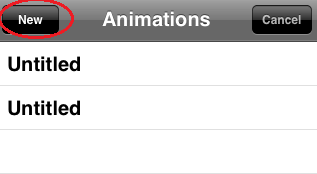
Step 1: Open up the application and tap on “New” button as shown below:

image

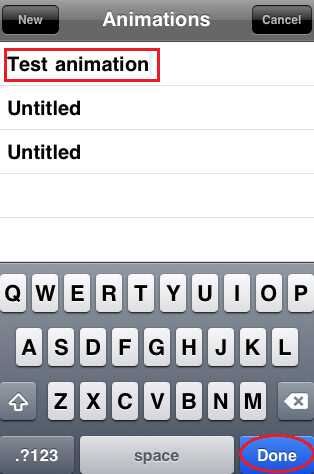
Step 2:  Type the name of the project and then tap “Done”.

image

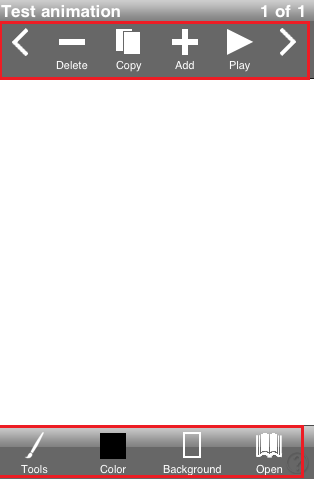
Step 3: Tap on the project you just created and you will see the white space all over your iphone. You can drag your finger across the screen to make the image. Here, I felt confused the first time I used the software…hey where are the menus? Well, I went to red-software developers site and as per their claim, this has been done in order to maximize the drawing experience without annoying buttons lingering on the top and the bottom. It seems to be a valid reason, then where will I get the menus? It’s in the help ! Just touch the iphone screen with three fingers at the same time and here you go, you will get the menu as shown in the following snapshot:

image 

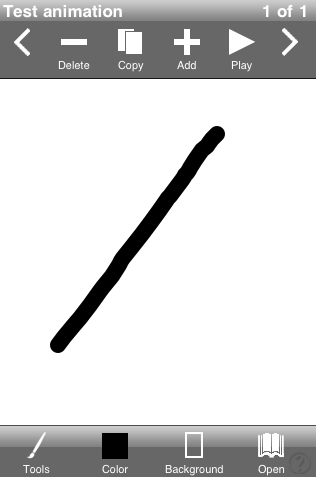
Anyways, just make the first animation image and then press “Add” button in the menu to add a new one.

image

Image: First animation snap

image

Image: Second snap

As you can see, when you create a next snap of your animation, the first snap appears as a shadow. Don’t confuse it, it’s just for your ease.

Step 4: Tap play button in the menu to see what you made! You can add as many frames as you like.

image

If you have iphone 3GS, then good news is that Animation Maker can support up to 24FPS in 3GS as compared to 12FPS supported on 2G/3G.

Watch the following video to see the above processes in action!! Enjoy your time with animation making.

( Write an email to the author of this post at adnan@techskipper.com ).

NASA, Microsoft launch new quest for Mars exploration

Martian

NASA and Microsoft have launched new website related to MARS exploration. The interesting fact is that any user can do an exploration and perform different activities such as improving maps of the planet which can in turn help scientists to improve their exploration.

“We’re at a point in history where everyone can be an explorer,” Doug McCuistion, director of NASA’s Mars Exploration Program, said. “With so much data coming back from Mars missions that are accessible by all, exploring Mars has become a shared human endeavor.
“People worldwide can expand the specialized efforts of a few hundred Mars mission team members and make authentic contributions of their own,” he added.

“The collaboration of thousands of participants could help scientists produce far better maps,” NASA and Microsoft said in a joint statement. – Telegraph
“There’s so much data coming back from Mars. Having a wider crowd look at the data, classify it and help understand its meaning is very important,” said Michelle Viotti, director of Mars Public Outreach at NASA’s Jet Propulsion Laboratory. “We’re also accomplishing something important for NASA.” – Telegraph
“The beauty of this type of experience is that it not only teaches people about Mars and the work NASA is doing there, but it also engages large groups of people to help solve real challenges that computers cannot solve by themselves,” said Marc Mercuri, Microsoft’s director of business innovation.

On the website, you can set your account to get MARS virtual passport 🙂 else you can be a visitor to explore only. You can reach the site by the following URL:

http://beamartian.jpl.nasa.gov/ 

Have a safe journey to red planet !

Convert your photo to cartoon

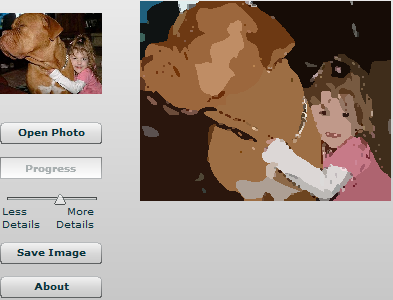
Want to convert you photo to cartoons? 🙂 Well, you definitely still believe in fairy tales … Amazing… I am also like that, want to see myself in cartoon characters. To do so, I searched the web for some tool which can be helpful in this conversion. Out of many, I have found the following one interesting enough to present to you.

image

It just take a few seconds for the conversion and voila … I think its worth a try.Here is how you will use it!

First: Download the tool using the following link:

http://www.freedownloadmanager.org/downloads/Photo_to_Cartoon_Online_62317_p/

Second: Extract the RAR file and run option1.html. It will open an internet explorer taking you to the page where conversion can be made.

Third: Click “open photo” button and choose the image which is to be converted. The bar will show the progress of conversion and soon the cartoon picture will show up!

music Search made easy with Google Music

google-music

In cyberspace, music is one of the most popular searches whether the search is for band or an album or the lyrics. About 20% of the top searches belong to music. For all music fans, great news is that gone are those days when people used to spend hours to search for their favorite band and particular album songs and still end up getting nothing or getting all paid stuff ;-). Here is a break, the cool feature of the new search is the free access to streaming audio version of the songs.

A lyrics tool is also integrated in Google music. Here is a scenario, you are driving a car while listening to the radio. You hear a song which you liked, just type a few words of it in the search bar, click search button and voila ! Band, Album, singer and the song — all will be there for you to explore.

There are handful of partners with Google for music search. These are imeem, lala, pandora, EMI, Sony Music, Universal Music Group and WB. In the following video, the music search is explained in a nut shell. Have a look !