Charge multiple gadgets at the same time with Callpod Chargepod

Chargepod

Having too many power hungry gadgets and yet a few of the ports to charge them up? Previously I introduced a Super USB hub which was capable of charging multiple gadgets but of course all with a USB interface. What if you have ten gadgets and all with different input interfaces? You surely would be requiring a Chargepod.

That’s a second Chargepod we are having, the first one charged 6 phones at the same time and it was about $50 gadget. The upgraded Chargepod will charge variety of gadgets simultaneously but all that will happen at an increased cost.

The truth is that in our times everyone has many gadgets but fewer ports to charge them up. So, Chargepod will definitely give a big relief. It will juice up your iPhone, smart phone, laptop, camera and a lot more devices. All these devices will connect to the device simultaneously and the device will itself take a single outlet.

The Chargepod V2™ is the world’s most versatile and powerful multi-device charger and docking system for PC / Mac laptops and mobile devices. It utilizes a three-sided functional design to support simultaneous operation on all sides of the device:
Side 1: Charges one PC/Mac laptop.
Side 2: Charges three small devices such as a cell phone, MP3 player, PDA, Bluetooth headset, digital reader, NAV unit, etc. and one high input device such as a video camera, portable DVD player, digital camera, etc.
Side 3: Has a 3-port USB 2.0 hub for data transfer such as downloading music, data files etc. or for connecting various peripheral devices to your PC/Mac laptop such as a keyboard, mouse, jump drive.
Chargepod V2 utilizes device-specific adapters – the same ones used for the award-winning Chargepod® – so you can customize it to meet your exact needs.
 

Continue reading »

Pictionaire: a multitouch table of the future

Pictionaire

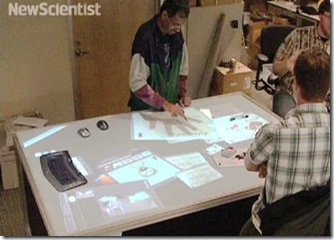
After the release of Apple iPad, I would rather call this desk an ‘iDesk’ which is originally named as Pictionaire. Currently, Pictionaire is under development by Microsoft Research and University of California, Berkeley. The Pictionaire is 4X6 foot table with a camera mounted right above it which can keep track of the objects placed on the desk.

The purpose of this desk is to turn real items into virtual objects. When a notebook with some sketch or writing is placed on the desk, digital tabs appear on all the four corners of the book. User has the power to drag any of its corner tab over while the camera above it take a photograph of the sketch on the notebook and as soon as the notebook is removed, the digital copy of the sketch is available on the desk to drag and use it anywhere. The reverse of this is also true, you can drag any digital object on the desk to a sketch pad and when it fits on it, you can make a sketch while the digital image is over the sketch page.

Continue reading »

Get Facebook Notifications on Windows Live Messenger

 Facebook-Notifier

Facebook has become a phenomenon and it is difficult to stay away from it. However, it is a fact that Facebook eats out our precious time. previously I introduced a Facebook sidebar gadget whose purpose is to stay up-to-date and at the same time save our time. However, this time I am introducing a Facebook gadget which can be integrated with Windows Live Messenger giving a marvelous look.

Let me come straight to its installation procedure:

Step 1:

Download Latest Windows Live Messenger from the following URL. If you already have the Live Messenger, skip this step.

Download Windows Live Messenger

Continue reading »

Apple ipad accessory: Gramercy– CGB150 Messenger Sling

COCOON INNOVATIONS GRAMERCY FOR IPAD

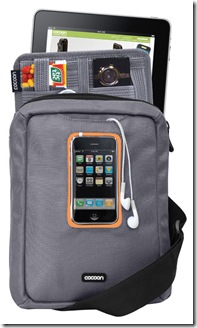
If you are an Apple fan and have a lot from Apple like iPhone, iPod, and now Apple iPad in near future, you probably would be thinking how to adjust all that stuff while you are on the go. Well cocoon Innovations, a company that produces gadget cases, messenger bags, slings, net book cases, laptop cases etc, have made it all simple with its innovative product called Gramercy which is capable of holding up your Apple stuff including the iPad.

The Gramercy Messenger Sling provides you with a windowed media pocket for storage so that you can use the device while is securely stored. This windowed pocket is compatible with Apple iPhone, iPod Touch, iPad and other smartphones as well as MP3 players. Gramercy comes with a shoulder strap so that you can easily carry it around.

Continue reading »

Turn Office Paper to Toilet paper with White Goat

toiletpaper_machine

Here we have an automatic machine which turns office paper to toilet paper rolls. This massive machine has been built by a Japanese company named ORIENTAL and what it does is take 40 A4 sized shredded paper sheets and convert them to a toilet paper roll in just about 30 minutes. You don’t need to buy a separate paper shredding machine since it has one built-in machine to shred your office paper. No jokes here but this machine is called ‘White Goat’. I would’ve chosen a better name if I were in charge of the development.

The working of the ‘White Goat’ also seems to be quite simple and environment friendly. It shreds the paper which is then dissolved in water making it thin. The thin paper is then dried out and converted to the toilet roll. As per the company’s statement, it takes 10 YEN ($0.11) to make one roll, pretty sleek. Lastly, regular use of the machine will save 60 cedar trees annually.

Continue reading »

Apple iPad, a revolutionary device at an unbelievable price

Apple-iPad

Apple is truly a remarkable place of geniuses who keep the world stunning by their awesome products. Just look at the latest iPad which is a dream come true situation for people around the globe. It will change the feel of the work we do in our daily lives.

iPad is pretty much similar to iPod Touch, you can call it a big brother of iPod Touch with bigger display, improved processor and much superior hardware specifications. iPad is supposed to fill the gap between the laptop and the smart phone. It uses Apple 1GHz A4 processor with custom built silicon which gives power to the device to do things at high speed. Here is what you will get from the iPad: efficient browsing, sharing photos, listening to the songs, watching videos, reading eBooks, playing games and using applications from Apps store.

Writing emails and notes is pretty much a fun. When you’ll click open the email client and start composing a message, I am pretty sure the huge virtual QWERTY keyboard will put a smile on your face. Since, the keyboard is quite large, it will not take long for users to get used to it. However, Apple has also announced an accessory called ‘Keyboard Dock’ which allows you to type using a standard QWERTY keyboard. So, all worries out!

Continue reading »

Iomega iConnect Wireless Data Station Connects USB Storage Into “Smart” Network

Iomega a global leader in developing innovative storage and network security solutions has developed an easy and simple solution to connect USB storage devices with your network, in the form of new powerful device Iomega iConnect Wireless Data Station. Which is designed to transfer all portable USB devices into “Smart” network storage which allows the user to share, access file and connect to internet anywhere in the world securely.

clip_image001

iConnect Wireless Data Station is very easy and simple to set up. What all you need is a wireless Router, USB storage drives and of course iConnect Wireless Data Station.

  • First connect the iConnect device with your router with wireless connectivity or Gigabit Ethernet (wireless solution gives more comfort).
  • Then plug-in you’re portable USB Storage Derives into iConnect’s USB ports.
  • Now they will be automatically connected to and accessible on your “smart” network.

Continue reading »

How-To: Backup the iPhone, Restore from a Backup & Delete a Backup

We had problems while trying to perform any illegal operations on iPhone; things went wrong and all information of our device is lost. It is recommended to all iPhone users to first take backup so that if things goes wrong you can at least recover your iPhone settings and information like sound setting, network settings, text messages, contacts, notes etc.

backup-iphone

More on how to create a backup, restore from a backup and deleting a backup and a difference between backups and syncing. Apple has published a Knowledge Base Article from iPhone and iPod Touch owners in which everything very clearly defined.

Here is what Apple has to say about the difference between Syncing and Backups:

Continue reading »

GeoHot hacked the Sony PS3

If you own an iphone or have heard about jailbreaking, you probably would’ve known GeoHot, the father of the jailbreaking. Now, he has hacked Play Station 3. These surely are stunning news for PS3 makers as they really did everything to make it impossible to hack the device. For the same reason, PS3 hasn’t been hacked since it arrived in the market about 3 years back.

We came to know about the news from twitter. Check this out:

GeoHot

Continue reading »

Nexus One Problems – Can Google Pose Significant Threat In The Long Run?

Google’s Nexus One was released in the market place in the first week of 2010. Since then it has not been able to capture the hearts of many, or let’s simply say that it has not lived up to the expectations.

HTC-Nexus-One-boot-up

One of the major problems it is facing is to attract the iPhone users who have been used to the touch and feel option which is somehow now present in the sales model of Nexus One. Most of the people are reluctant to spend money on it unless they become familiar with it with their friends spending money on it first and using their as a working model.

A lot was anticipated and expected by over hyped Google’s Nexus One. The first week of sales did not turn out to be what the sales people sitting in Google HQ had foreseen. According to figures Google only managed to sell 20,000 Nexus One handsets in the first week compared to its rivals iPhone, HTC myTouch and Motorola Droid who managed to cling 1.6 million, 60,000 and 250,000 sets in the first week of sales.

Continue reading »