Unlock iPhone 3.1.3 3G 3GS with ultrasn0w

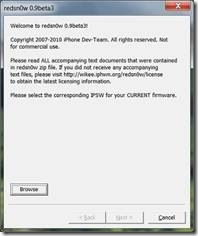
Now you can jailbreak your iPhone 2G,3G and 3GS (old bootroms) using sn0wbreeze 3.1.3, upgrading your latest iPhone OS 3.1.3 firmware while preserving your older baseband. And iPhone 3G and 3GS with baseband 04.26.08 baseband can be unlocked using ultrasn0w and use blacksn0w to unlock iPhone 3G and 3GS with baseband 05.11.07 baseband.

ultrasn0w

How to jailbreak and unlock iPhone 2G, 3G, and 3GS:

Continue reading »

Unlock iPhone 3.1.3 3G 3GS with blacksn0w

Good news is out, now you can easily unlock your iPhone 3.1.3, 3G and 3GS the old bootrom one, as Sn0wbreze 3.1.3 is now available and can be easily downloaded to jailbreak your iPhone. The details of how to jailbreak iPhone using Sn0wbreeze and ultasn0w has already been discussed. If your iPhone has baseband 04.26.08 baseband than use ultrasn0w and if its 05.11.07 baseband than use Geohot’s blacksn0w to jailbreak your iPhone.

iPhone 3GS

Now you just have follow some steps to unlock your iPhone 3G, 3GS old bootrom on iPhone OS 3.1.3 using blacksn0w.

How to: Jailbreak iPhone on 3.1.3:

Step 1:

To jailbreak our iPhone 3G or 3GS using sn0wbreeze 3.1.3 on iPhone firmware 3.1.3 then click on the following link How To – Jailbreak IPhone 3G 3GS 3.1.3 With Sn0wbreeze – V1.3

Steps to unlock iPhone 3G or 3GS (old bootrom) on 3.1.3:

Continue reading »

How to – Jailbreak iPhone 3G 3GS 3.1.3 with Sn0wbreeze – V1.3

As reported earlier by one of our authors (Sanix) Jailbreak And Unlock Latest IPhone 3.1.3 With Sn0wbreeze 1.4, now is the time to guide you through to jailbreak iPhone 2G, 3G and iPhone 3GS on latest iPhone firmware 3.1.3 using Sn0wbreeze – V1.3. Here I would like to mention that iPhone 3GS users with older bootrom (non-MC model) will be able to jailbreak successfully, on the other hand iPhone 3GS users who have upgraded to the stock 3.1.3 still need to wait.

Sn0wbreeze 1 

Continue reading »

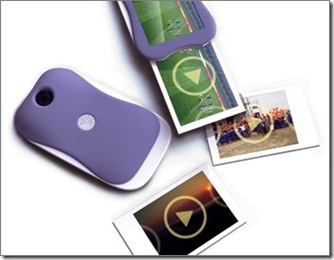
Movie Polaroid Camera can print movies on a flexible display

Movie-Polaroid-Camera

We at TechSkipper are giving you peep in to what technology is goanna like in the future. For the same reason, we presented some excellent ideas currently under development, the list is as follows:

DISPLAX : The touchScreen wallpaper

Pictionaire: a multitouch table of the future

Nokia’s Concept Phone – Morph

Future of Electric vehicles and Plug-in Hybrid vehicles

LCD screen can recognize what happens in front of it

Floating apartments to be built in Holland!

Today we will introduce a Movie Polaroid camera which can print videos as well as the voice associated with it on a substrate that mimics traditional Polaroid film paper. Amazing right? So, you can imagine printing a video on a piece of small object and then playing the video by simply tapping the play button on the screen. The concept itself is a gift for people who love to capture every moment of their lives in the camera.

Continue reading »

Restore Nexus One To Factory Default Settings

Previously with Android 2.0 or less, to restore Nexus One, one had to go through a recovery process which was time taking and frustratingly technical. But with Android 2.1 which is the latest OS running on Nexus One, restoring it to factory settings has become very easy.

To reset Nexus One to factory defaults, just go to Settings –> Privacy –> Factory Data Reset.

A warning will be given about what this option will do. Let’s go through the warning as a whole:

Continue reading »

Jailbreak and Unlock Latest iPhone 3.1.3 With Sn0wbreeze 1.4

IPhone OS 3.1.3 has been released a few days back. With the new release people tend to find new and updated tools that can jailbreak and unlock their iPhone with the latest OS.

The new iPhone OS 3.1.3 can be downloaded and updated from within iTunes. Just connect your iPhone to your system and update it through iTunes. The latest release seems to have updated the baseband firmware that means that we have to be very careful while upgrading our iPhones. The following warning was issued about jailbreaking the latest iPhone OS:

Continue reading »

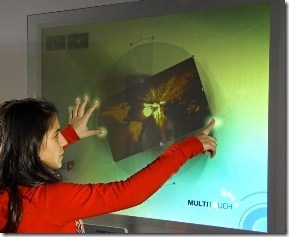
DISPLAX : The touchScreen wallpaper

Displax

The technology is truly moving to a point when you will see the touch screen thing everywhere around you. We have multitouch table (Read about multitouch table which is under-development), multitouch phone and now multitouch wallpaper. DISPLAX is something we are talking about; it is being made by a Portuguese company and is intended to make up multitouch wallpaper as you can see in the snap. Interestingly enough, DISPLAX is thinner than a paper and it can detect up to 16 touches on its surface at once.

Continue reading »

iPhone 4G Could Come With Touch Sensitive Back Panel Casing

Goldman Sachs Group analyst Robert Chen claimed in one of his interview to Bloomberg that the next generation iPhone could come up with 5- megapixel camera and touch sensitive casing.

iphone-4g

In that interview Chen said that the new iPhone 4G will come up with many new innovations especially in its hardware which will be replaced with touch sensitive plastic panels, and it will be the way Apple’s magic Mouse works.

Apart from hardware changes Chen also claimed that the new iPhone will have an advanced camera (5-megapixel) and obviously an updated version of operating system.

Continue reading »

Infinidock App for Jailbroken iPhones Lets You Enable a Horizontal Scrolling iPhone Dock

For those users of iPhone who have a lot of iPhone application installed on their iPhone, to save your time and to manage all of your application easily and not to scroll several pages and instantly launch your favorite application. Here is a solution for it. Now you can bookmark all your application which you use frequently on iPhone dock.

clip_image001[1]

From the developer of popular multitasking iPhone app, ProSwitcher chpwn, here comes another application “Infinidock”, which does exactly what we talked about earlier. This application lets the jailbroken iPhone users to add as many icons as they choose to their iPhone dock without cluttering their interface. On the dock the app are horizontally aligned and it’s up to you how many app should be visible at a time. By swiping you can easily view other app on the dock.

The note about the jailbreak app by the developer reads:

Continue reading »