How to install themes on a jailbroken iphone
The following is a step by step process for installing themes on a jailbroken iphone.
Step 1) Install WinterBoard on your iphone. You’ll have to install it from Cydia if not already there.
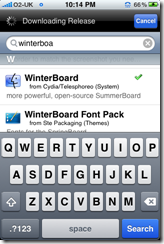
NOTE : If you already have a winterboard on your iphone, skip to step 2
Step 2) Install Microsoft Dot Net Framework from the following link, if you already have .Net Frame 2.0 or later, skip to next step
NOTE : If you already have .Net Framework installed on your PC, skip to Step 3.
Step 3) Download iphone Explorer from the following link:
Install it on your PC, its quite simple. (Read a review of iPhone Explorer)
Step 4) Open up iphone explorer; it will ask you to choose the root, choose the first option as shown in the following snap:
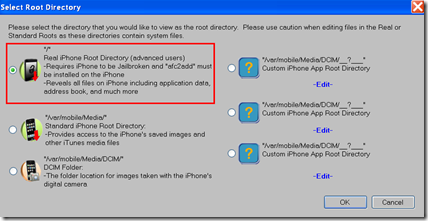
Step 5) Go to Library>>Themes, the rest is drag and drop. If you get an error ‘iphone explorer has encountered a problem and needs to close …’. Click here to find a fix.
Close winterboard, the iphone will automatically change its theme to a new one. Enjoy a new look!!
DOWNLOAD TOP 50 FREE IPHONE THEMES BY CLICKING HERE
*******************************
Follow us on Twitter @TechSkipper
Write an email to the author of this post at adnan@techskipper.com
*******************************
how to install themes, install theme
[…] How to install themes on a jailbroken iPhone […]