War Craft 3: Error “Windows NT not supported” on Windows Vista

image: War Craft
War Craft 3 is one of the most popular games around the world but it has some known issues on windows vista such as the one mentioned in the title. Last week, I visited one of my friend’s house and I felt excited to know that he bought a new War Craft 3 DVD. So, we unpacked the DVD and tried to run on his computer having Vista installed on it. But as soon as the installation was over and we tried to run the game, it gave us this error “Windows NT Not Supported”; it was quite a strange situation since we were running Vista and was giving us error of Windows NT. So, after some effort we found a way out, I want to share it with you.
Whenever you face such an issue, it is always better to change the compatibility mode. In this case, I changed to compatibility mode to “Windows XP (Service Pack 2)” and it worked for me. The procedure is simple. Right Click the game icon and go to properties, then select “compatibility” tab. Choose the compatibility mode from the drop down menu.
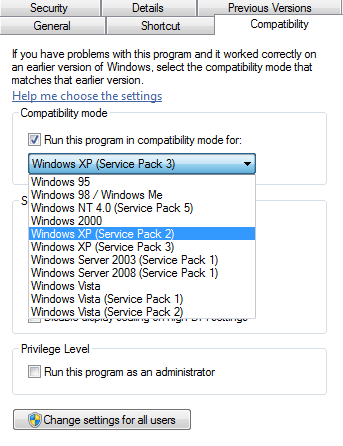
image: Changing the compatibility mode
Note: Try a different mode in case the above mentioned mode doesn’t work for you.
Follow us on Twitter @TechSkipper
Write an email to the author of this post at adnan@techskipper.com
compatiblity mode, war craft 3, windows nt not supported
thank you so much this helped alot
Some great information on there. I bookmarked this website.
i’m using windows vista home premium
service pack 1.
i try to install the Warcraft II Frozen Throne on my PC
but why the compability things like u said still not worked….
can someone help me!??!?!?!?
plz help me….
i’ll be at :
mds_manrihu@yahoo.co.id
thx very-very-very much
ahhh i am gettn same message on my new laptop, however im running windows 7 and when i right clic onto properties it doesnt have a compability tab..please email me a solution eleveneleven@live.com.au
im also using windows 7 32bit. i did all the this mentioned above, but still warcraft didn’t run. please mail me.
i cant download reign of chaos..
Give me a Solution At http://www.kennysoulz@hotmail.com
Thks
i tried what u said but it didnt work the error that keeps coming up is that there is no cd in the drive when it is ? please help thanks
how in windows 7 did it works to???