Convert Flash Files (swf) to a screen saver
If you love to make animations in flash then you will be quite exited to know that you can convert your master pieces to your screen saver. The procedure is illustrated in detail as follows:
First, download InstantStorm from the following URL:
After the downloading and installation is over, follow the following snaps for making a screen saver:
Step 1:
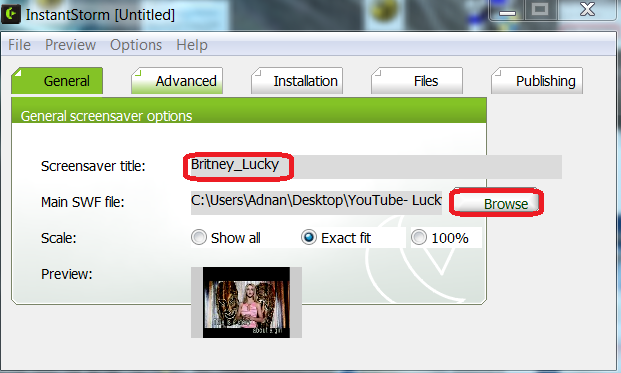
Step 2:
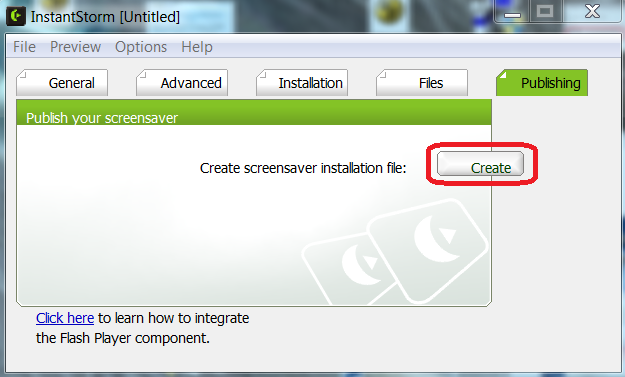
Step 3:
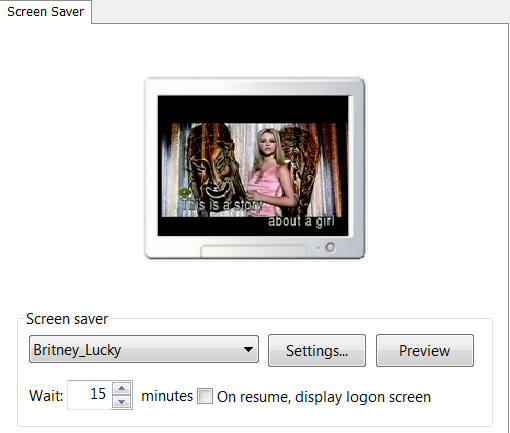
By default, a screen saver exe file will be created on the same folder as the source. Run the exe file to install the screen saver and voila!
Follow us on Twitter @TechSkipper
Write an email to the author of this post at adnan@techskipper.com
convert swf to screen saver, InstantStorm
[…] https://www.techskipper.com/computer-hacks/softwares/convert-flash-files-swf-to-a-screen-saver/#more-… […]